rêverie
rêverie

rêverie brings your school life into one place — organised, unglamorous, and actually followed through.

Calendar is where it starts: import your timetable straight from Schoology, ManageBac, or Google Calendar, or add events yourself. One clean view of everything ahead, with nothing lost between five different apps.

When it's time to revise, Revision turns whatever you're studying into a real quiz — AI-generated questions at whatever difficulty you choose, graded instantly, with explanations for anything you get wrong.

Notes is where the studying happens first: structured, properly organised, not just a text box. Write them once, then send any note straight into Revision to turn it into a quiz on the spot.

Add friends, keep track of what they're up to, and get reminded before anything sneaks up on you.

No ads, no cost, nothing to configure before it's useful.

rêverie

calendar

your calendar, imported and all in one place — nothing lost between five different apps.

rêverie
rêverie

hide events

iCal links do not reliably label events by subject, so instead of grouping by course, select individual imported events you don't want to see — this only hides them here, it doesn't change anything in the original calendar.

click to select · shift-click to select a range · ctrl/cmd-click to add one at a time

rêverie

profile

photo uploads coming soon.

appearance

plans

you're currently on Free. upgrading isn't live yet — this is a preview of what's coming.

Free
$0
1 AI generation / month
English only
progress analytics
priority generation
collaborative notes
ad-free
cloud sync
full shape/motion quiz UI
minimal theme toggle
unlimited deck storage
Daydreams (study streaks)
Sparks earn rate: 1x
More
$2.97/mo
or $24.97/yr — ~30% off
5 AI generations / month, banked
all languages
progress analytics
priority generation
collaborative notes
ad-free
cloud sync
full shape/motion quiz UI
minimal theme toggle
unlimited deck storage
Daydreams (study streaks)
Sparks earn rate: 1.5x
Unlimited
$5.47/mo
or $49.97/yr — ~24% off
unlimited AI generations
all languages
progress analytics
priority generation
collaborative notes
ad-free
cloud sync
full shape/motion quiz UI
minimal theme toggle
unlimited deck storage
Daydreams (study streaks)
Sparks earn rate: 1.5x

password & security

import timetable

import up to 3 calendars — each gets its own shape so you can tell them apart on the calendar.

friends

loading...

notifications

choose when you're reminded before a deadline.

terms & conditions

contact the host

delete account

this permanently deletes your account and all data stored here. this can't be undone.

rêverie

revision

turn what you're studying into a real quiz — AI-generated, graded instantly, with explanations for anything you miss.

1 easy → hard 10

quiz

past attempts

rêverie

notes

structured notes, not just a text box — write once, then turn any note into a quiz on the spot.

time
description
source

add personal event

this stays only in rêverie — it will never sync to original calendar source.

finding your schoology calendar link

  1. Log into Schoology in your web browser (not the mobile app).
  2. Click your profile picture/icon in the top corner, then go to Settings.
  3. Look for a section called "Share Your Schoology Calendar."
  4. If it isn't already enabled, turn it on.
  5. Schoology will generate a private link starting with webcal://.
  6. Copy that entire link and paste it into the import field on this page.

finding your managebac calendar link

  1. Log into ManageBac.
  2. Go to Dashboard.
  3. Look for an option called "View Full Calendar"
  4. Find the option "Subscribe to Calendar"
  5. ManageBac will generate a private link starting with webcal://.
  6. Copy that entire link and paste it into the import field on this page.

finding your google calendar link

  1. Open Google Calendar on a computer.
  2. Click the settings icon, then click Settings.
  3. Look for a section called "Settings for my calendars"
  4. Select your calendar and find the Integrate Calendars section.
  5. Select Private Link and it will generate a link starting with webcal://.
  6. Copy that entire link and paste it into the import field on this page.

This link is like a password to your calendar — only paste it here, never share it anywhere else.

01 / 05
rêverie

No ads. No clutter. Just what you need.

02 / 05
Plan without friction.

Every calendar you already use, pulled into one place.

03 / 05
Write the way you think.

Built light, so it stays fast and out of your way.

04 / 05
Revise smarter, not longer.

Real methods, tuned to what you're studying.

05 / 05
Welcome
01 / 05
your school life,
genuinely organised.

rêverie brings together everything school throws at you — timetable, notes, and revision — into one place built to be used, not just looked at. Calendar pulls in every source you already have. Notes is a real structured editor, not a text box. Revision turns what you've written into instant practice, using real questions whenever they exist.

02 / 05
every calendar,
one place —
swipe away what's done.
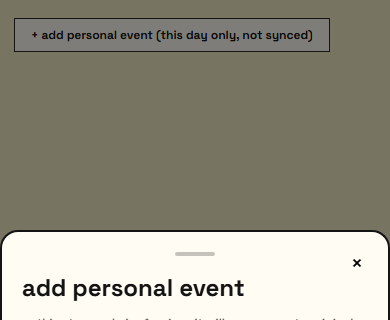
the add-event sheet mid-drag, showing the swipe-to-dismiss gesture

Imports your timetable straight from Schoology, ManageBac, or Google Calendar — each source keeps its own marker shape. Add personal events with the + button, repeat them daily, weekly, or monthly, share with friends. Done with something? Drag the sheet down or flick it away.

03 / 05
notes that are
actually structured.
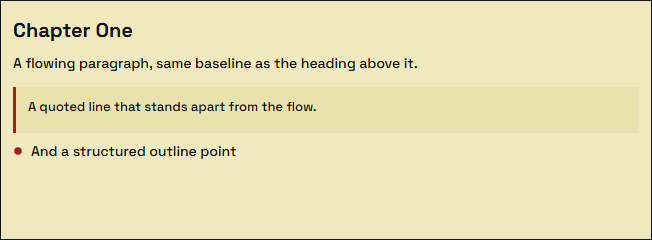
a note showing heading, paragraph, blockquote and outline blocks together

Notes isn't one big text box — it's built from proper blocks: paragraphs, outline points, headings, blockquotes, and tables, each with its own look. Type "- " at the start of a line to turn it into an outline point instantly; Tab and Shift-Tab indent and outdent from anywhere in the line. Select text to bold, italic, underline, or colour it — even inside a table cell. Every note can become a quiz in one click.

04 / 05
turn any topic
into practice,
in seconds.
the revision difficulty range slider

Pick one or several topics from the tree, or paste your own notes instead. Anything already in the question bank comes back instantly; anything new gets generated fresh. Choose how many questions (5 to 20) and how hard, using a difficulty range instead of easy/medium/hard — then get graded instantly, with an explanation for anything you got wrong, not just a checkmark.

05 / 05
you're set.

replay this anytime from settings → tutorial.